Best Practices for Writing Tests
Introduction
In this documentation, we'll talk about good habits for when you're coding a test.
Another good source to know the best practices is the Microsoft Documentation for writing Unit Tests. We can also use many of those tips when writing Integration Tests.
Example File
This issue is part of an idea to have a catalog of examples of good code. The example chosen in this case is the Commands Controller tests in Mobiltracker API.
Test Driven Development
We follow the Test Driven Development (TDD), a software development technique in which we write the test first, watch it as it breaks, and then implement the functions necessary to solve our problems. This way, we can help to avoid a false positive.
Another good practice is to begin by testing the errors we know are most likely to happen. Then, by leaving the successful test for last, we can be more confident that we have a code that is more robust and less susceptible to failure.
Naming and Organizing
When we're writing API Integration Tests, it's good to keep them organized so they'll be easier to maintain. A good way to do it is by having a folder called Controllers and dividing the tests for each controller in a different file. Such as this example:
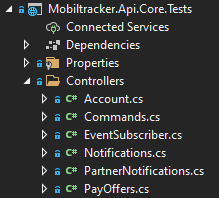
Inside the file, the namespace must be the name of the controller. And each of the possible routes should be divided into a different class.
namespace CommandsController
{
  public class GET_TrackerCommands
  {
    [...]
  }

  public class GET_CommandPatterns
  {
    [...]
  }

  public class POST_CommandRequest
  {
    [...]
  }
}
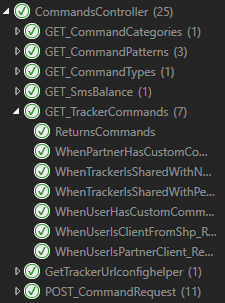
Now, the name of each test should make explicit what scenario we're testing. This way, we know what's supposed to happen. For example:
[Fact]
public async Task WhenTrackerIsSharedWithNoPermissionCommand_Returns404()
{
  [...]
}

[Fact]
public async Task WhenTrackerIsSharedWithPermissionCommand_ReturnsCommands()
{
  [...]
}
These naming suggestions come from the Microsoft Documentation linked earlier.
With all that, we'll have tests much more organized in the Test Explorer section of Visual Studio.
Scenario Builder
When we're creating a test, we should use a Scenario Builder to design an environment that will make it possible to see if everything is working properly.
It must have methods that help us personalize this environment, such as these examples:
var builder = new ScenarioBuilder()
    .AddUser(u => u.PartnerId = Guid.NewGuid())
    .AddTracker(t => { t.TrackerClassId = 1; })
    .AddAuthorization();
It'll be useful if many of these methods have as an optional parameter a function that lets us configure more specifically the things we'll need to test. It's important to always make the data explict.
[Fact]
public async Task WhenTrackerIsSharedWithNoPermissionCommand_Returns404()
{
    var builder = new ScenarioBuilder()
        .AddUser()
        .AddTracker(t => { t.TrackerClassId = 1; })
        .AddUser()
        .ShareLastTrackerWithUser(s => s.PermissionCommand = false)
        .AddAuthorization();

    [...]
}

[Fact]
public async Task WhenTrackerIsSharedWithPermissionCommand_ReturnsCommands()
{
    var builder = new ScenarioBuilder()
        .AddUser()
        .AddTracker(t => { t.TrackerClassId = 1; })
        .AddUser()
        .ShareLastTrackerWithUser(s => s.PermissionCommand = true)
        .AddAuthorization();

    [...]
}
Notice that in the method
ShareLastTrackerWithUser(), we're making explicit what we want to test: the PermissionCommand property.
The Test
For the testing, we use the testing tool xUnit, which provides us the Assert functions we use to verify the response of the API call we're testing.
public async Task WhenTrackerIsSharedWithNoPermissionCommand_Returns404()
{
    [...]

    using (var scenario = await builder.BuildAsync())
    {
        var response = await scenario.HttpClient
            .GetAsync($"trackers/{scenario.Tracker.TrackerId}/commands");

        Assert.Equal(404, (int)response.StatusCode);
    }
}
Notice that we built the scenario we designed earlier and used it to test.
In the case of this test, we expected it to return an error 404, so we used the Assert.Equal() to verify if we received exactly what we wanted.